Launch on 300+ directories without handing anyone your repo
Directory listings get a new product found and give it its first backlinks. The forms are boring, and half the free ones want their badge on your site. Here's how to hand the work to your own AI agent and keep your keys.
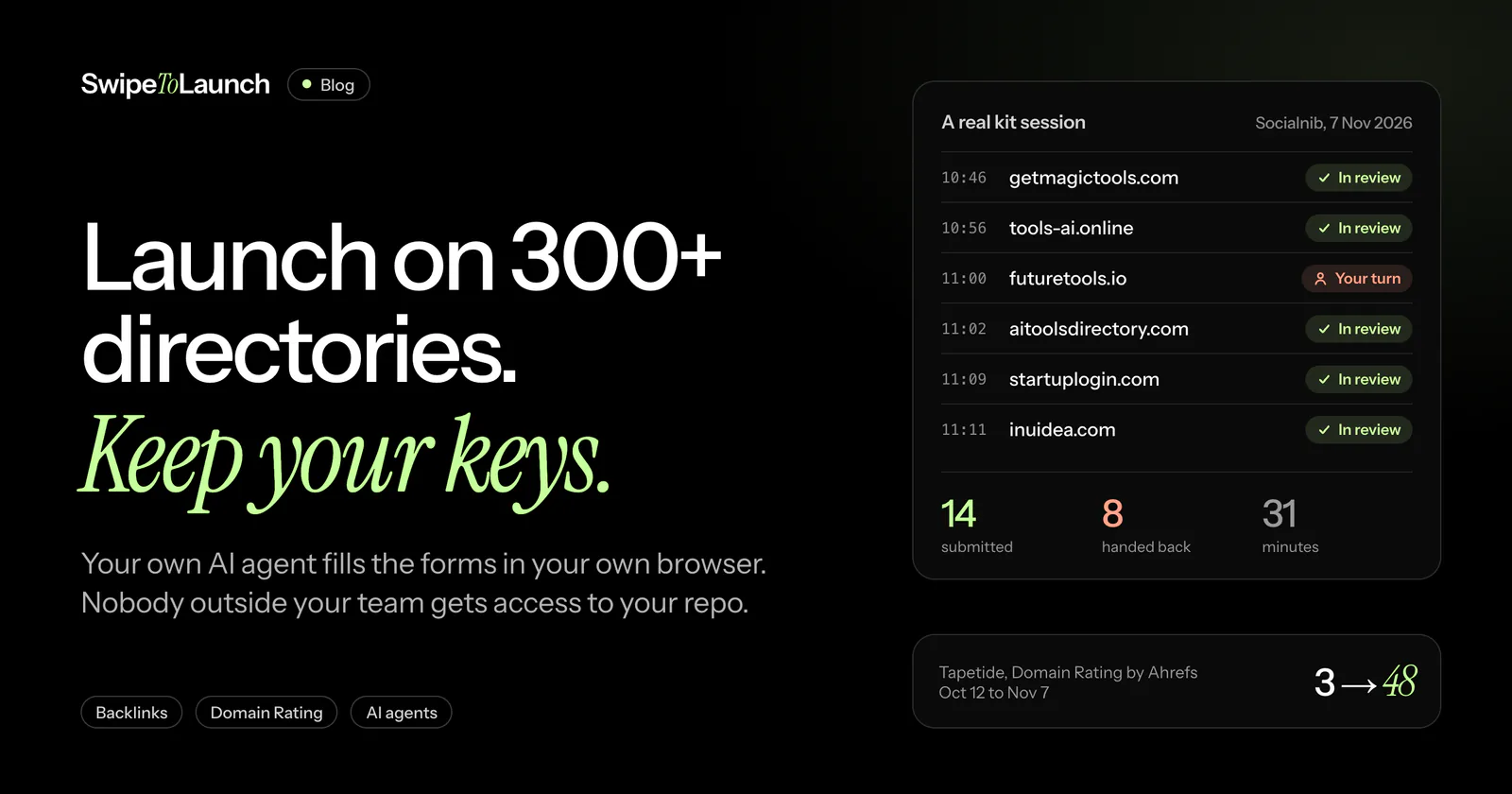
A new product starts with no audience, no links and a Domain Rating close to zero. Launch and startup directories are the cheapest way out of that hole. Each listing is a page people browse on purpose, and many of them link back to you.
The catch is the work. Every directory has its own form, its own image sizes, its own rules and its own review queue. This post covers why the listings matter, how they feed Ahrefs' Domain Rating, and how to hand the boring part to an AI agent without handing anyone the keys to your site.
Why directory listings matter
Three things happen when a directory lists your product.
People find it. Launch sites and tool directories have visitors who came to look at new products. Category pages on the bigger ones can rank in Google for searches like "best social media scheduler", so a listing keeps sending visitors after launch week is over.
You get referral traffic. It's small per site. Across a hundred sites it adds up, and those visitors arrive already curious about what you made.
You get backlinks. Each listing links to your site. In the kit's database, 188 of the 318 directories with a free listing give a followed link. 106 don't, and for 24 we couldn't confirm either way. Followed links from many different domains are what move Domain Rating.
How backlinks feed Domain Rating
Domain Rating (DR) is Ahrefs' 0 to 100 score for the strength of a site's backlink profile. Ahrefs counts the domains that link to you with at least one followed link, and gives each one weight by its own DR, split across every site it links to. A second link from the same domain adds nothing, and so does a nofollow link.
The scale is logarithmic: DR 20 to 21 is a much smaller step than DR 70 to 71. That's why a new site can move fast. The first few dozen referring domains count for a lot.
Two honest caveats. DR is Ahrefs' metric, not Google's, and Google ranks pages, not domains. Ahrefs itself says not to chase DR for its own sake. It is still a fair gauge of how much link authority a new domain has built, and some directories show it right on their submit forms.
Here is what happened to ours. We ran three of our own products through the kit in October 2026 and read their DR from Ahrefs along the way.
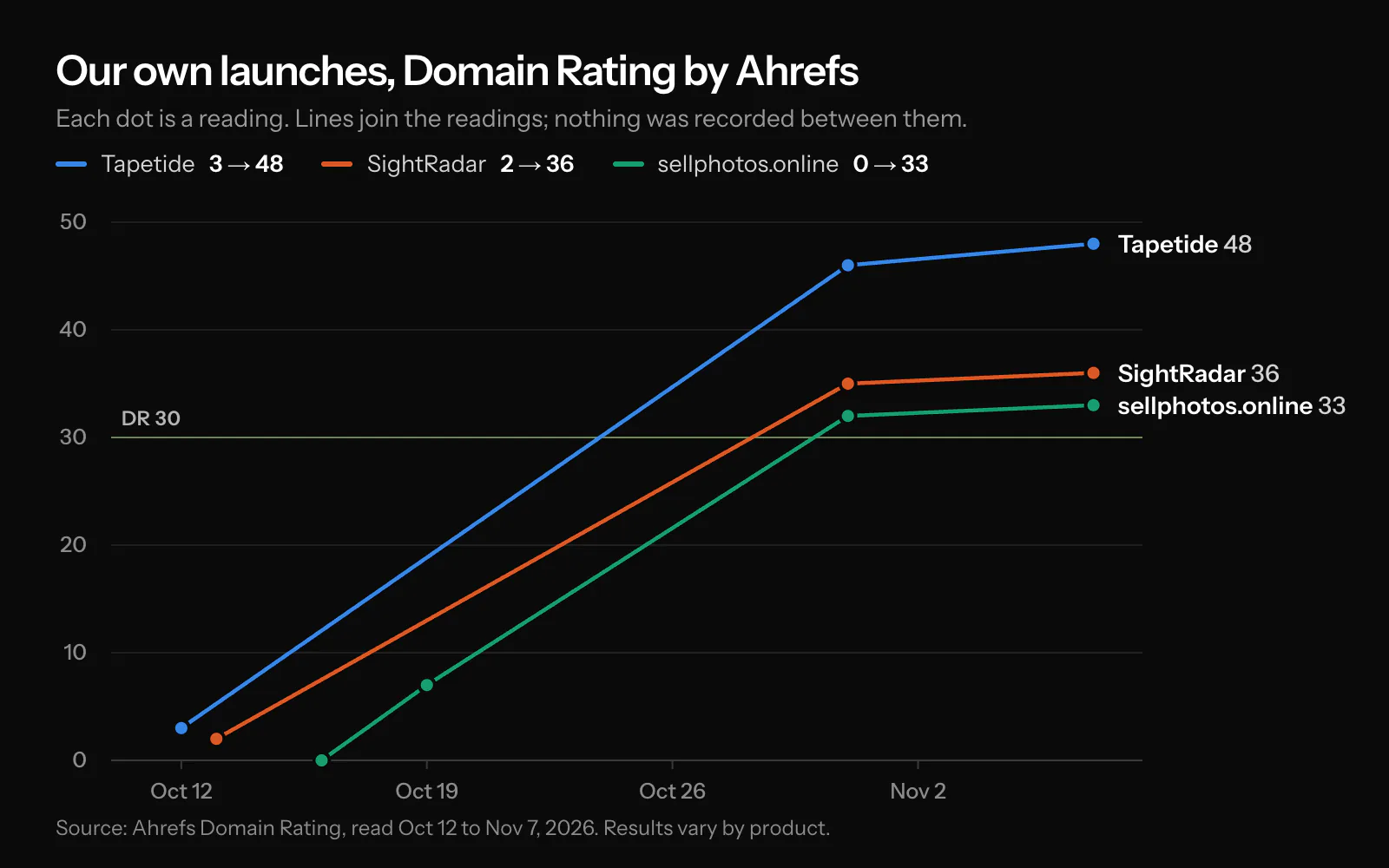
| Product | First reading | Oct 31 | Latest reading |
|---|---|---|---|
| Tapetide | DR 3 (Oct 12) | DR 46 | DR 48 (Nov 7) |
| SightRadar | DR 2 (Oct 13) | DR 35 | DR 36 (Nov 7) |
| sellphotos.online | DR 0 (Oct 16) | DR 32 | DR 33 (Nov 7) |
All three were past DR 30 by the October 31 reading, 15 to 19 days after their first. That's three products, and they're ours, so read it as an example and not a forecast.
If your domain starts at DR 0 to 10 on Ahrefs, the kit has a guarantee. Run it on at least 100 directories within 14 days of buying. If, 30 days after your purchase, Ahrefs shows your domain below DR 30, send us the kit's report.csv within 45 days of buying and we refund the full $29. One refund per person. The full terms are in the kit FAQ.
The boring part
A submission is never just a URL. Here is some of what our agent met in one 31-minute session for Socialnib, a social media tool, on November 7:
- getmagictools.com asked for two fields, the name and the URL, and writes the listing itself from your homepage.
- tools-ai.online wanted a description, two categories, five tags, a pricing model, an icon and a 16:9 screenshot.
- bestwebdesigntools.com wanted a 1400x950 preview image.
- insidr.ai had redesigned its form since the playbook was written.
- nextool.ai reviews in 24 to 48 hours. textlinkdirectory.com takes 30 to 60 days.
Before any form there's a search to make sure you aren't already listed. Socialnib was: index.dodopayments.com had created a listing on its own. After the form come confirmation emails, review queues and a record of where you stand on every site. At about 40 minutes a directory by hand, the estimate we use for our own submission service, 100 directories is more than 60 hours of form filling.
What your agent does with the kit
The Launch Agent Kit is a folder your AI agent reads. It works with Claude Code, Codex, Cursor, Antigravity, OpenCode, Copilot and Devin. Inside:
- A database of 300+ directories with a free listing: submit URL, sign-in type, free or paid, whether the link is followed, review time, image specs and text limits. Release 1.0.2 has 471 records. 318 have a free path, and 83 are marked skip, each with a dated reason, such as belonging to a link network.
- A playbook per directory: the steps in order, and the gotchas that trip agents up.
- A shortlist builder that keeps only the directories that fit your product.
- One listing template your agent trims to each site's limits, and an image pipeline that renders screenshots, covers and social cards in the sizes the forms ask for.
- A tracker with every submission's status, and a report at the end.
Then you tell your agent to start. It opens each site in your Chrome, fills the form from the playbook, reads the confirmation and records the result. Sign in once to your launch Google account and its Gmail, and the agent handles Sign in with Google, sign-ups and email codes by itself. It hands you the browser for CAPTCHAs, Google password or 2FA prompts, phone checks and payments. It never posts votes, comments or reviews, and never invents people or numbers.
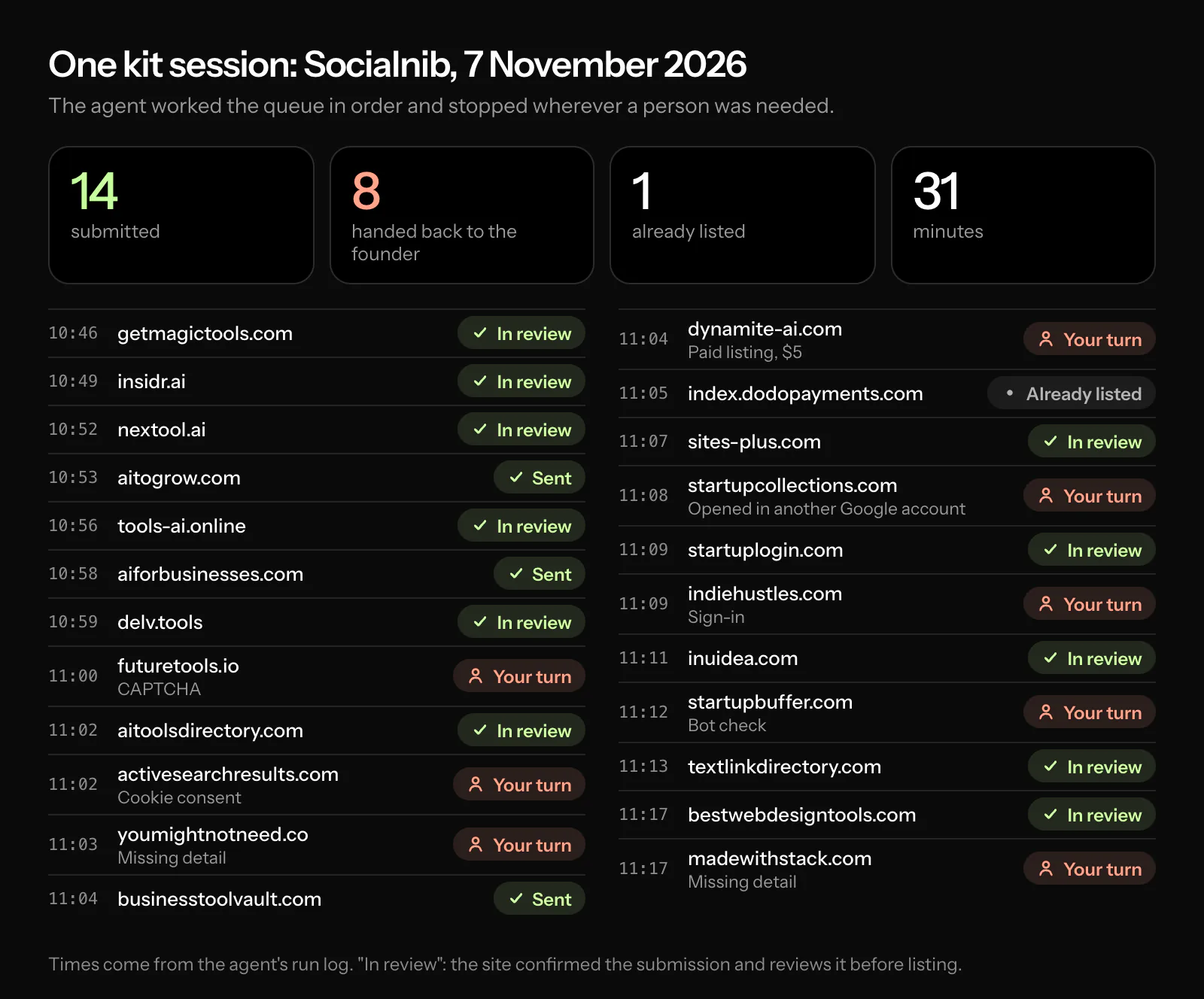
In the Socialnib session the agent submitted 14 directories in 31 minutes and handed 8 back to the founder: two bot checks, two sign-ins (that browser wasn't signed in to the launch account), one listing that had become paid-only ($5), one cookie banner it wouldn't accept on the founder's behalf, and two forms that asked for details it didn't have, such as the tools the product is built with. One more site already listed Socialnib. Stopping is the point. A guess on a form is a wrong listing you have to chase later.
The badge problem
Many directories don't list you for free. They list you in return for their badge on your site.
In release 1.0.2 of the kit's database, 160 of the 318 directories with a free listing need their badge on your website. That's half. Among launch platforms, the Product Hunt style sites, it's 64 of 98, about two in three. And 53 of the 160 want the badge to link to your exact listing, which you only get after you submit. Some look for the badge in the HTML your server sends before they approve you, and check again later.
SwipeToLaunch works this way too: a free listing here goes live once our badge is on your homepage.
So a badge is a code change on your production site, often one per directory, often after the submission. That changes what "done for you" can mean.
Why your own agent is the secure way
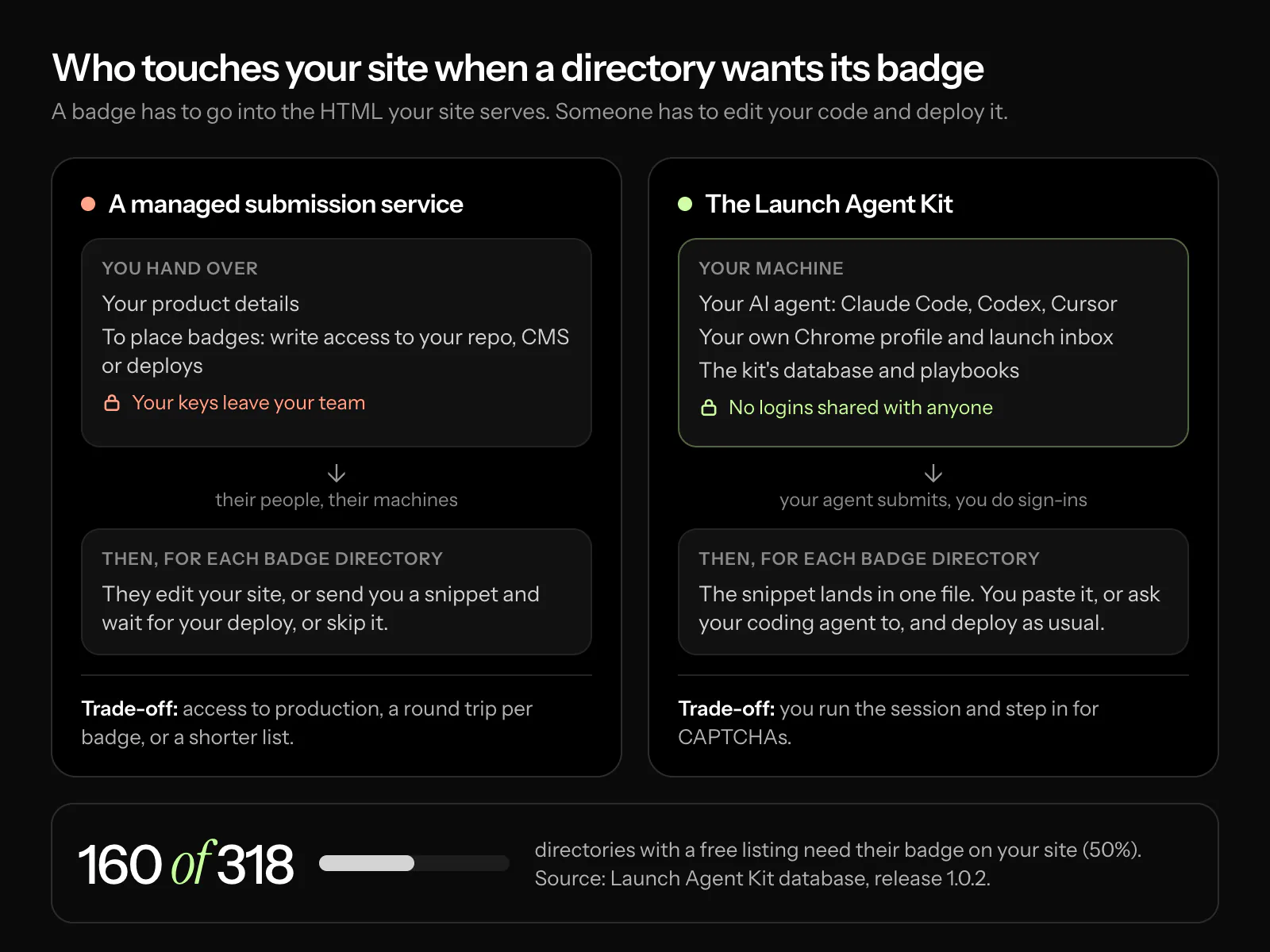
A managed submission service can handle badge directories in one of three ways:
- Ask for access to your repo, your CMS or your deploys, so its people can add each badge.
- Send you the snippets and wait for you to deploy each one. The work comes back to you, one round trip per directory.
- Skip them. On the kit's numbers, that's about half the free directories.
The first one deserves a hard look. Write access to your code or your deploys is the most sensitive thing your product has. Giving it to an outside team for a link campaign means trusting their people, their machines and their password habits, and it's hard to see afterwards what changed.
With the kit, nothing leaves your machine. Your agent works in your own browser. We suggest a separate Google account for launches, in its own Chrome profile, and you sign into it yourself. The agent never types a password, and it reads only the emails from the site it's working on. The kit has no telemetry, so your results and logs stay with you.
For badges, the kit writes every snippet into one file. You paste the block into your footer, or ask the coding agent you already use in that repo to do it, and deploy it like any other change. The kit never edits your site itself, and nobody outside your team gets a login.
The snippets default to rel="sponsored noopener". Google's spam policies count links given in exchange for something as link spam unless they're marked sponsored or nofollow, so that's the safe default. 36 directories' checkers only accept a followed badge, and SwipeToLaunch is one of them: a free listing here needs our badge as a followed link, and the paid plans skip the badge. The kit flags every such site, and you decide site by site.
When a managed service still makes sense
If you'd rather not run anything yourself, a done-for-you service is a fair choice. Ask how it handles badges before you pay. We sell one too: our directory submission starts at $99 and doesn't ask for access to your repo or deploys. Its brief has one checkbox for badges. Tick it and we send you each badge's code to add to your site yourself. Leave it off and we skip the directories that require one.
How to start
- Paste your product's URL on the kit page and pay $29 once. The download opens straight away.
- Unzip it, open the folder in your agent, and say: "Read START-HERE.md and set this kit up for yourproduct.com".
- Pick a badge policy.
nonedrops badge directories from your shortlist,manualgives you a task for each badge, andauto-filealso collects the ready badges into one footer block. - Let it work through the shortlist, and step in when it asks.
Take a first reading with our free Domain Rating checker before you start, so you have something to compare against.
Where the numbers come from
- DR readings: Domain Rating by Ahrefs, for tapetide.com, sightradar.com and sellphotos.online, from Oct 12 to Nov 7, 2026. The first reading of each came from a directory's submit form that shows Ahrefs DR, the rest from Ahrefs through our DR checker.
- Directory counts: the Launch Agent Kit database, release 1.0.2, checked between October 16 and November 2, 2026, counted record by record.
- The Socialnib session: the agent's run log and results from November 7, 2026.
- How DR works: Ahrefs' explanation of Domain Rating.
- Link spam and sponsored links: Google Search spam policies.
FAQ
Do directory backlinks still help a new site?
They help most at the start, when a domain has no referring domains and each followed listing adds one. They won't replace links from people who write about you, and link farms can hurt, which is why the kit marks 83 directories as skip, each with the reason.
How long until Domain Rating moves?
Directories take anywhere from a day to two months to approve a listing, and Ahrefs updates DR as it finds the new links. Our three products were past DR 30 by the October 31 reading, 15 to 19 days after their first. Yours depends on which directories approve you, and when.
Is it safe to let an AI agent fill in forms for me?
It runs on your machine, in your browser, with your accounts. You sign in yourself and it never types a password. Where a site's terms ask for a person, the kit marks it for you to do by hand: 25 directories in release 1.0.2. If a site blocks the agent or asks it to stop, it stops.
Do I have to add badges to my site?
No. Set the badge policy to none and the 160 badge directories drop off your shortlist. That still leaves 158 with a free listing and no badge.
Which AI agents does the kit work with?
Claude Code, Codex, Cursor, Antigravity, OpenCode, Copilot and Devin, and other agents that can use MCP. The kit is a folder your agent reads, and the open-source Playwright MCP lets it drive Chrome. Your agent subscription isn't included.
What does it cost?
$29 once, with free 1.x updates. You can get a full refund within 14 days, and the DR guarantee above covers domains that start at DR 0 to 10. See the kit page for the full terms.